PCE.emu (PC Engine Emulator)
- 4.5
- Rating
- 10.00K
- Installs
- $3.99
- Price

 Analysis by App-foxy
I keep coming back to PCE.emu for one very specific reason: it turns an Android device into a focused way to play PC Engine and TurboGrafx-16 software. That sounds simple, but the effect is different from using a broad, all-in-one emulator. Instead of digging through support for many unrelated systems, I get an app built around one console family and the kind of short, responsive arcade-style sessions that suit it.
Developed by Robert Broglia, this paid arcade game costs $3.99 and is aimed at anyone who already has a legitimate way to use the games they want to play. It is rated for Everyone, has a 4.5 average from around 1.1 thousand ratings, and has passed 10 thousand installs. Those figures suggest a small but committed audience rather than a mass-market gaming app, which matches my experience: this is a purposeful tool for retro players, not a casual game designed to explain itself to everyone.
The important distinction is that the app is an emulator, not a built-in game collection. I would not install it expecting a catalog of playable titles waiting on the first launch. Its value depends on bringing compatible game files from a lawful source and then using the emulator to run them. For the right person, that separation is useful; for someone who wants instant entertainment without setup, it is the first sign that a different kind of app may be a better fit.
You May Also Like

 Pandora - Music & Podcasts
Pandora’s Music Is Easy to Start, but Harder to Recover
Pandora’s strength is its low-effort path from a seed to a station. Its weak spot is how much confidence it asks you to place in connection, setup, and quiet recovery.

 8 Ball Pool
 Is Built on Rivalries, Rematches, and Routine
A close look at the rivalries, rematches, shared routines, and unanswered safety questions that turn a quick pool match into a persistent mobile community.

 Samsung Music
’s Quiet Strength Is Playing What You Already Own
Its reach comes less from spectacle than from dependable access to a personal library. That simplicity is both the app’s strongest retention engine and its ceiling.

 AccuWeather: Weather Radar
AccuWeather Review: A Quick, Clear Forecast for Everyday Decisions
For everyday plans, the best forecast is the one you can understand quickly. AccuWeather makes rain timing, radar, and local conditions easy to act on, with a few trade-offs.

 Hill Climb Racing
Why Hill Climb Racing Still Turns Crashes Into One More Run
A tiny car, a bumpy hill and one more upgrade: Hill Climb Racing keeps resurfacing because its simple chaos makes every near-miss feel personal.

 AliExpress - Shopping App
AliExpress Makes Global Shopping Feel Personal, but Shoppers Bear the Risk
AliExpress turns a global marketplace into a pocket-sized discovery engine. Its reach is useful, its shopping loop compelling, and its trade-offs easy to miss.
More From Our News Desk
View All News


Why the dedicated PC Engine focus matters
The central capability is straightforward: PCE.emu recreates the environment needed to run PC Engine and TurboGrafx-16 games on Android. In practice, that narrow focus gives the app a clearer purpose than a general emulator that treats every classic platform as another item in a long menu.
I find that useful when I am in the mood for this particular library. The PC Engine family has a strong connection to fast arcade-style play, compact stages, shooters, action games, and quick retries. A dedicated emulator lets me open the app with that expectation already set. I am not sorting through unrelated console settings or wondering whether a game belongs to the system I intended to play.
The real benefit is reduced friction after the initial setup. Once the correct files are available, the app’s identity is clear: choose a game, configure the controls to suit the screen, and get on with playing. That focused workflow matters more on a phone than it might on a desktop, because mobile sessions are often brief. When I have only a few minutes, a tool that stays centered on one platform feels more comfortable than a huge emulator front end full of systems I am not using.
There is also a preservation angle. Older hardware is not always convenient to connect, and original systems, controllers, and displays can require space and patience. An Android emulator cannot reproduce the physical feel of a real PC Engine controller, but it can make the software easier to revisit. I see PCE.emu as a bridge between keeping an old console stored away and having its games available for a short personal session.
What the first session is really like
The first thing I would prepare is not the emulator itself but the game library. I would organize legally obtained files in a folder that is easy to find, use clear filenames, and keep backups somewhere separate. This small step prevents the most common frustration: opening an emulator and assuming that the app should already contain games. It does not work that way.
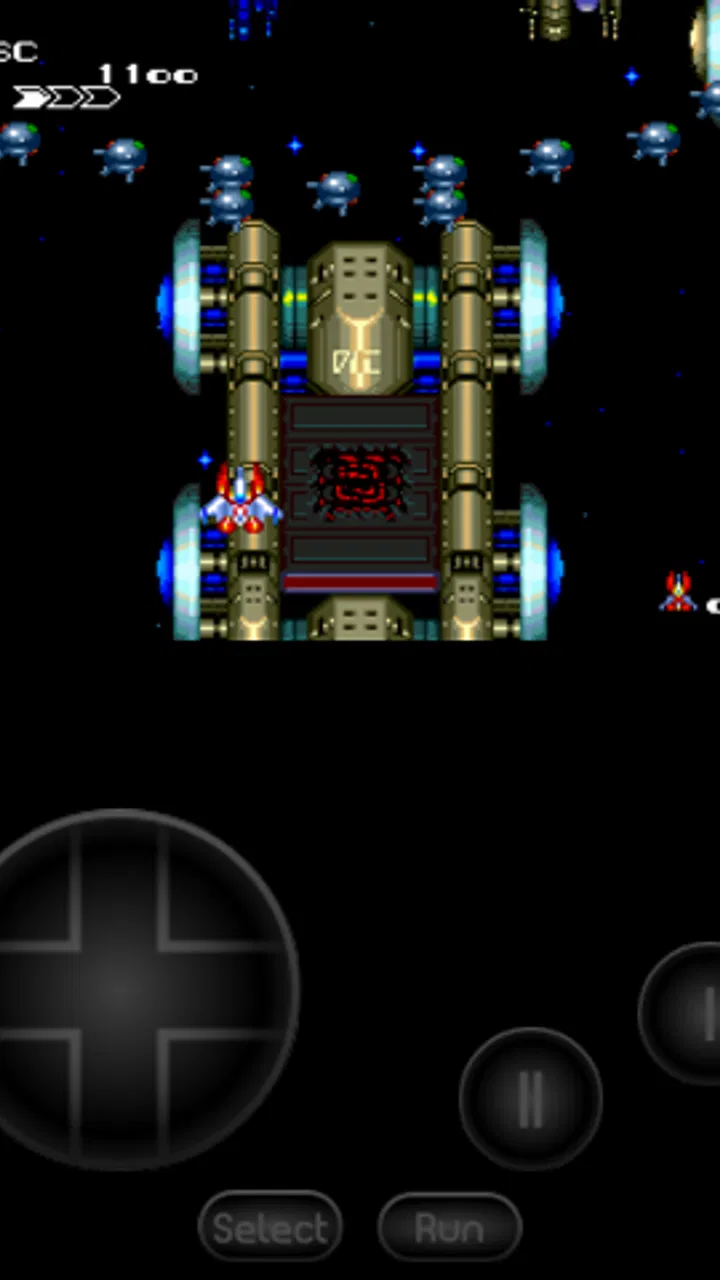
After that, the practical task is learning the on-screen controls. Touch buttons are convenient, but they do not feel identical to a physical controller, especially in games that demand rapid directional changes or repeated button presses. I usually spend a few minutes checking whether the virtual layout feels natural before judging the game. If the device supports a compatible external controller, that is the route I would choose for longer sessions, while touch input is perfectly reasonable for testing a title or playing casually.
The screen itself changes the experience. A phone is bright, portable, and always nearby, but it is also smaller than a television and can become crowded by virtual controls. I prefer holding the device in a stable position rather than trying to play while walking or multitasking. That sounds obvious, yet it makes a noticeable difference with fast arcade games: the less I fight the phone, the more attention I can give to timing and movement.
I would also treat save management as part of the workflow rather than an afterthought. Classic games often expect repeated attempts, and an emulator can make it tempting to save constantly. I find the best balance is to use ordinary in-game progress when I want the original challenge, then reserve emulator saves for sensible stopping points or for a difficult section I genuinely need to pause. Saving before every obstacle can remove the rhythm that makes these games satisfying.
A realistic everyday use case
My favorite use case is a short evening session after finishing other tasks. I can sit down with the phone, choose one PC Engine game from an organized folder, and play for fifteen or twenty minutes without setting up a television or searching through a large multi-system collection. That is where the dedicated design makes sense: the app supports a specific mood instead of trying to become a complete retro-gaming dashboard.
It also works well for travel, waiting rooms, and other moments when I want something more focused than a modern mobile game. A classic arcade title can offer immediate action without a long tutorial, account system, or daily reward loop. I still need to be comfortable with the setup and touch controls, but once those are settled, the short-session format feels natural.
For a longer weekend session, I would be more selective. I would use a controller if possible, make sure the phone has enough battery, and decide in advance which games I actually want to play. PCE.emu is at its best when I approach it as a small, curated library. Loading every file I own and treating the app like a giant archive makes the experience less personal and can turn a focused emulator into another cluttered menu.
Small habits that improve the experience
One useful habit is to test one game at a time rather than assuming that every file will behave identically. If a title does not launch or feels wrong, I first check the file source and compatibility before changing several settings at once. Making one change at a time helps me understand whether the issue comes from the game file, the controls, or the emulator configuration.
Another is to create a short “currently playing” group outside the emulator’s full library. I do not need dozens of choices visible whenever I open the app. Keeping a handful of favorites makes the launch-to-play process faster and helps me finish games instead of endlessly browsing them.
I also recommend adjusting controls for the game rather than searching for one perfect layout that suits everything. A platform game may benefit from larger directional buttons, while a shooter may feel better with more space around the action buttons. The trade-off is that customization takes time, but that time is usually better spent once than repeatedly compensating for an uncomfortable default arrangement.
Where the focused design helps, and where it does not
The strongest trade-off is convenience versus authenticity. PCE.emu makes old software portable, but a touchscreen is still a touchscreen. For slower games or occasional play, I can adapt without much trouble. For demanding action, the lack of tactile feedback can make mistakes feel like control problems rather than player mistakes. A physical controller or original hardware is better when precise input and the feel of the buttons are central to the experience.
There is also a learning curve that casual players may not expect. The app is not the same as downloading a modern mobile game, tapping an icon, and starting immediately. I need to understand my own file organization, decide how I want to handle saves, and spend time with the control layout. None of that is unreasonable, but it means the purchase makes more sense for someone who already knows why they want PC Engine or TurboGrafx-16 emulation.
The price changes the comparison too. At $3.99, this is not a free experiment, although the cost is modest for a specialist tool I expect to use repeatedly. A free general emulator may appear more attractive to someone who wants to try several systems, but it can bring a less focused interface or encourage collecting more than playing. On the other hand, if I only want one occasional retro session and do not have a particular interest in this console family, paying for a dedicated app is harder to justify.
Compared with original hardware, the Android route wins on portability and convenience but loses the physical character of the console. Compared with a broad multi-system emulator, PCE.emu wins when I want a cleaner PC Engine-centered experience, while the broader alternative wins if my library jumps constantly between systems. Compared with modern retro collections, this app offers a more direct connection to the original platform style, but it does not provide the same polished presentation or ready-made accessibility that some curated collections include.
These differences matter because there is no universally best choice. I would choose PCE.emu for a specific library and a desire to play it on Android. I would choose original hardware for a dedicated home setup. I would choose a general emulator for someone whose interests are spread across many consoles. I would choose a modern collection for a newcomer who wants minimal configuration and a guided experience.
Questions I would settle before buying
The first question is whether the app includes games. It should be approached as the emulator component, not as a preloaded game store. I would only buy it after confirming that I have legitimate game files suitable for my intended use. That expectation alone can prevent disappointment.
The next question is whether a phone is enough. Yes, an Android phone can make the app useful for portable play, but the quality of the experience depends heavily on screen size, grip, and input. A larger device can make virtual controls easier to see, while a controller can make demanding games much more comfortable. If I dislike touchscreen gaming in general, I would plan for external input rather than expecting the emulator to solve that preference.
Another question is whether it is suitable for children. The age rating is Everyone, but the practical answer still depends on the games selected and on how the device is configured. The app itself is a tool; the content and difficulty come from the software being played. I would treat the rating as a broad suitability signal, not as a promise that every classic game will appeal to every child.
Some readers will also wonder whether the app is worthwhile for only one or two games. In my view, it can be, if those games are important enough to you and you value portable access. If the interest is merely curiosity, a broader option or a curated release may offer a gentler introduction. The dedicated focus becomes a strength only when the PC Engine library itself is part of the appeal.
Finally, I would ask whether the app is better for preserving a collection or for finishing games. It can serve both purposes, but I get more enjoyment when I use it as a playing tool rather than a digital warehouse. A carefully chosen set of titles, sensible save habits, and a comfortable control setup produce a much better experience than endlessly importing files without actually starting them.
Who gets the most from it
The best audience is a retro player who already knows the PC Engine or TurboGrafx-16 library and wants a practical Android option. That person will understand the value of a dedicated emulator, accept the need to manage legitimate game files, and be willing to tune controls for the games they play most. For that user, the app’s narrow purpose is reassuring rather than limiting.
It is also a good match for someone who prefers short arcade sessions. The platform’s style fits quick attempts, repeated practice, and portable play, while the emulator removes the need to keep older hardware connected. I especially like it for players who want to revisit a few favorites rather than build an enormous multi-system collection.
I would not recommend it as the first stop for someone who has never used an emulator, owns no PC Engine-related games, and wants instant access with no preparation. I would also steer away from it for players who mainly want modern conveniences, a large built-in catalog, or a single interface covering many unrelated consoles. Those needs point toward a different category of product.
My overall view is positive but specific. PCE.emu does not need to be everything; its appeal comes from doing one retro-platform job with a clear identity. The $3.99 purchase is easiest to defend when I already have a genuine interest in PC Engine and TurboGrafx-16 games and want to carry that interest on Android. If that describes you, I think the focused approach, portable format, and room for a carefully managed library make it a worthwhile specialist choice. If not, the same focus may feel like a restriction rather than a benefit.
FAQs for PCE.emu (PC Engine Emulator)
01What is PCE.emu, and which games can it run?
PCE.emu is an emulator designed to play games released for NEC’s PC Engine and TurboGrafx-16 systems on compatible Android devices. It can run many HuCard and supported CD-based titles, depending on the game format and the files you provide. Compatibility is generally strong, but individual results may vary with less common releases, regional versions, or demanding CD games.
02Does PCE.emu include PC Engine games, BIOS files, or ROMs?
No. PCE.emu is an emulator, not a game collection, so it does not normally include copyrighted ROMs, disc images, or BIOS files. You must provide game files from software you legally own and, for certain CD-based titles, obtain the required system BIOS separately. Always check the laws in your country before creating or using backups.
03What file formats and accessories are supported by PCE.emu?
PCE.emu supports common PC Engine and TurboGrafx-16 game formats, including HuCard-style ROM files and compatible CD images, although exact support can depend on the release and required BIOS. The app also provides configurable controls and commonly supports external gamepads. Storage permissions, file locations, and controller compatibility may differ between Android versions and devices.
04How well does PCE.emu perform on Android phones and tablets?
Performance is usually smooth on modern Android phones and tablets because PC Engine hardware is relatively lightweight to emulate. Most users can expect responsive gameplay, save states, customizable display options, and audio that closely reflects the original system. Older or budget devices may experience occasional slowdowns, especially with CD games, enhanced graphics settings, or poorly optimized background apps.
05Is PCE.emu easy to configure for new users?
PCE.emu is fairly approachable once your game files are organized, but first-time users may need to spend a few minutes configuring folders, controls, display preferences, and BIOS settings for CD titles. The emulator offers useful customization, including button mapping, save states, screen scaling, and controller support. Users unfamiliar with emulation may need to consult the included documentation or online guidance.
Pros
- Accurate PC Engine and TurboGrafx-16 emulation across many games.
- Save states make it easy to pause and resume progress anywhere.
- Supports customizable on-screen controls and external gamepads.
- Fast-forward and rewind features help skip slow sections or mistakes.
- Runs well on many devices without requiring demanding hardware.
Cons
- Requires legally obtained game files; no commercial games are included.
- Touch controls can feel cramped during fast-paced action games.
- Some advanced settings may be confusing for first-time emulator users.
- Compatibility and performance can vary between individual game titles.
- The app may feel expensive compared with simpler emulator alternatives.

PCE.emu (PC Engine Emulator)
Gallery